> ## Documentation Index
> Fetch the complete documentation index at: https://docs.gnosispay.com/llms.txt
> Use this file to discover all available pages before exploring further.
# Integration models : Permissionless vs Partnerships
> Gnosis Pay offers two ways of integrating Gnosis Pay APIs. Whether you’re building as a developer or looking to launch a whitelisted branded solution, Gnosis Pay is designed to be flexible and accessible for all developers and businesses.
## Integration Models: Permissionless vs Partnerships
Gnosis Pay offers two ways to get started:
1. Permissionless Integration
2. Partnership Integration
***
## 1. Permissionless Integration
Developers can start building with our APIs right away—no need to contact us or go through an approval process. This lets you quickly enable crypto payments, card issuance, and account features for your users.
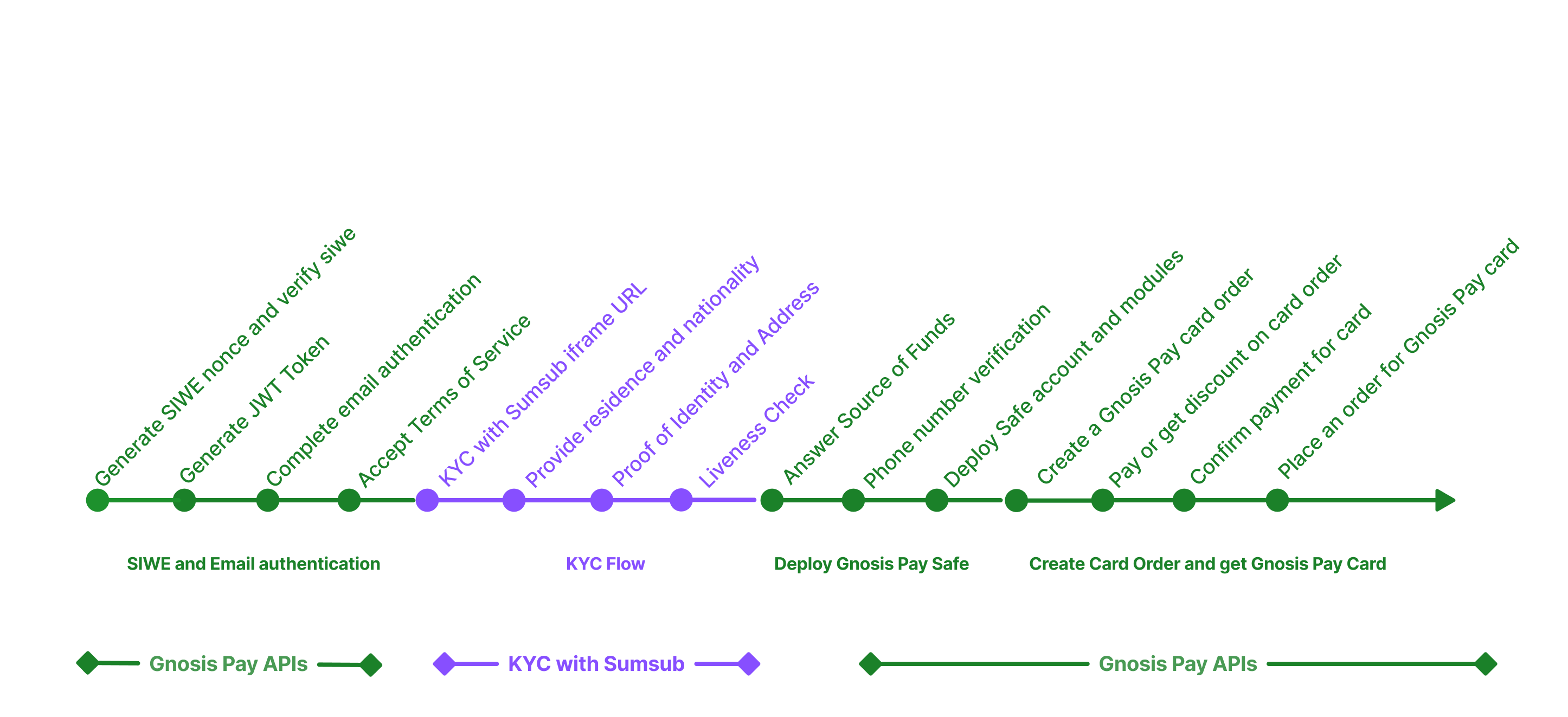 This integration requires no special credentials. Simply authenticate with our APIs using SIWE (Sign-In with Ethereum) to receive a JWT token and start building.
**Who it's for:** Developers or small teams who want to explore the APIs, prototype, or run very lightweight programs.
* ✅ Make API calls immediately — no API keys, approvals, or contracts
* ✅ Issue and manage Gnosis-branded cards for testing and early users
* ✅ Experiment with basic functionality (card issuance, transactions, balance queries)
* ❌ Attribute card activity back to your business (no webhooks, no tracking)
* ❌ Display sensitive card details (requires Partner Secure Element)
* ❌ Launch a branded card program at scale
Once you want to connect card activity to your app/business or expose sensitive card details, you'll need to switch into Partnership mode.
***
## 2. Partnership Integration
If your company is interested in deeper collaboration—such as branded cards, custom user experiences, fee rebates, or co-marketing opportunities — you can sign up through our [Partners Dashboard](https://partners.gnosispay.com/).
**Domain Whitelisting Required**: During partner signup, you must provide all production and staging domains where your application will be hosted. These domains are whitelisted for SIWE (Sign-In with Ethereum) authentication and CORS.
* **localhost**: Automatically allowed for local development (e.g., `localhost:3000`)
* **Production/Staging**: All non-localhost domains must be registered during signup
* Applications running on non-whitelisted domains will face authentication failures
This integration requires no special credentials. Simply authenticate with our APIs using SIWE (Sign-In with Ethereum) to receive a JWT token and start building.
**Who it's for:** Developers or small teams who want to explore the APIs, prototype, or run very lightweight programs.
* ✅ Make API calls immediately — no API keys, approvals, or contracts
* ✅ Issue and manage Gnosis-branded cards for testing and early users
* ✅ Experiment with basic functionality (card issuance, transactions, balance queries)
* ❌ Attribute card activity back to your business (no webhooks, no tracking)
* ❌ Display sensitive card details (requires Partner Secure Element)
* ❌ Launch a branded card program at scale
Once you want to connect card activity to your app/business or expose sensitive card details, you'll need to switch into Partnership mode.
***
## 2. Partnership Integration
If your company is interested in deeper collaboration—such as branded cards, custom user experiences, fee rebates, or co-marketing opportunities — you can sign up through our [Partners Dashboard](https://partners.gnosispay.com/).
**Domain Whitelisting Required**: During partner signup, you must provide all production and staging domains where your application will be hosted. These domains are whitelisted for SIWE (Sign-In with Ethereum) authentication and CORS.
* **localhost**: Automatically allowed for local development (e.g., `localhost:3000`)
* **Production/Staging**: All non-localhost domains must be registered during signup
* Applications running on non-whitelisted domains will face authentication failures
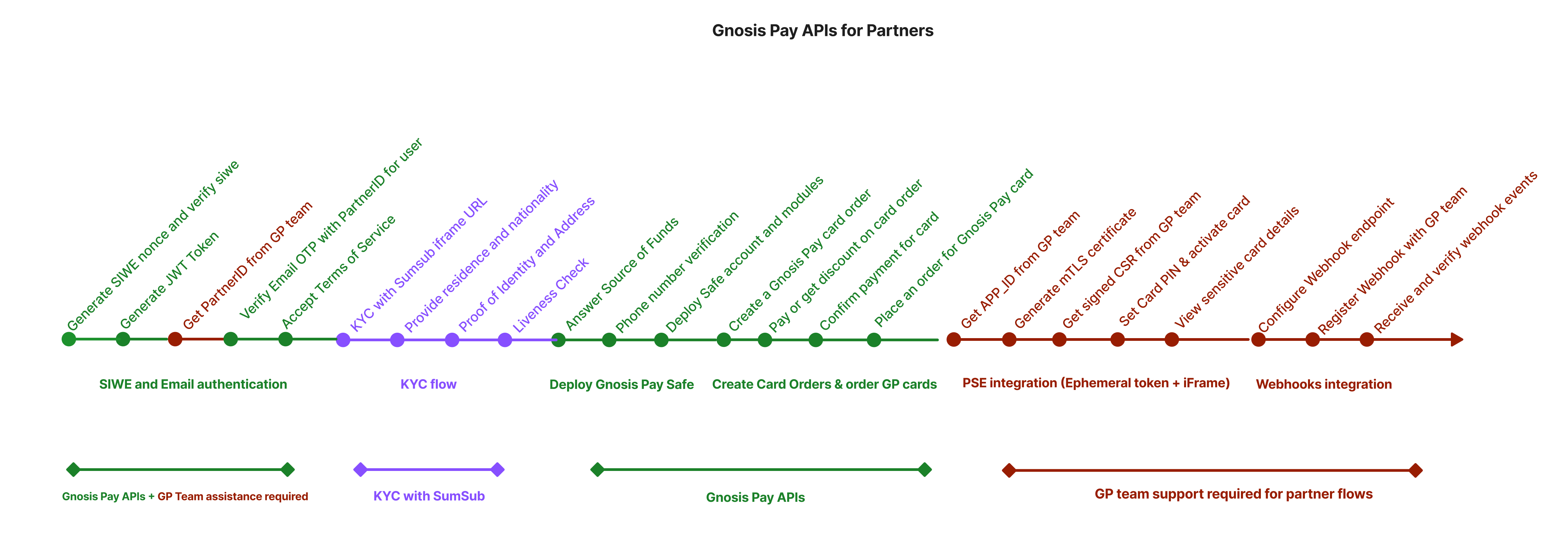 **Who it's for:** Any partner ready to move beyond experimentation and operate a live program.
* **Partner ID** → Required for webhooks, attribution, and tracking
* **App ID** → Required for Partner Secure Element (PSE) access
* Branded cards and custom experiences
* Multi-market support
* BIN sponsorship
* Compliance oversight
Direct access to Gnosis Pay team for technical guidance and business support.
Complete integration into your systems with webhooks and analytics.
## **Getting Your PartnerID and APP\_ID**
Through our self-service [Partners Dashboard](https://partners.gnosispay.com/), partners can:
* **PartnerID**: A unique identifier for partner organization within the Gnosis Pay ecosystem, enabling us to track user acquisition and attribute activity to integration.
* **APP\_ID**: An application-specific identifier that allows partners to authenticate with the PSE (Partner Secure Elements) and establish secure mTLS connection authentication between partner and Gnosis Pay.
**Who it's for:** Any partner ready to move beyond experimentation and operate a live program.
* **Partner ID** → Required for webhooks, attribution, and tracking
* **App ID** → Required for Partner Secure Element (PSE) access
* Branded cards and custom experiences
* Multi-market support
* BIN sponsorship
* Compliance oversight
Direct access to Gnosis Pay team for technical guidance and business support.
Complete integration into your systems with webhooks and analytics.
## **Getting Your PartnerID and APP\_ID**
Through our self-service [Partners Dashboard](https://partners.gnosispay.com/), partners can:
* **PartnerID**: A unique identifier for partner organization within the Gnosis Pay ecosystem, enabling us to track user acquisition and attribute activity to integration.
* **APP\_ID**: An application-specific identifier that allows partners to authenticate with the PSE (Partner Secure Elements) and establish secure mTLS connection authentication between partner and Gnosis Pay.
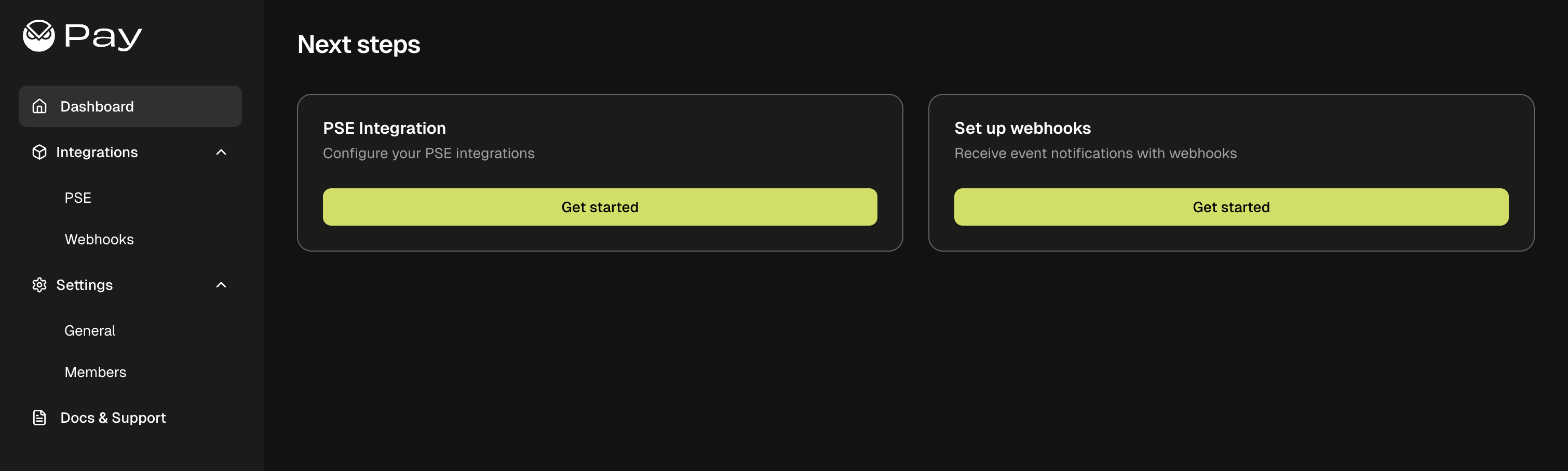 To get your PartnerID and APP\_ID through the Partners Dashboard:
1. Sign up at [partners.gnosispay.com](https://partners.gnosispay.com/)
2. Include your company details and app domains (required for CORS whitelisting)
3. Get your PartnerID and APP\_ID instantly upon registration
4. Handle PSE integration setup, CSR signature, and webhook configuration directly through the dashboard
**Critical**: You must include all your production and staging domains during signup. While localhost is automatically allowed for development, all other domains must be whitelisted for both CORS and SIWE authentication. Missing domains will cause authentication failures and API access issues.
To get your PartnerID and APP\_ID through the Partners Dashboard:
1. Sign up at [partners.gnosispay.com](https://partners.gnosispay.com/)
2. Include your company details and app domains (required for CORS whitelisting)
3. Get your PartnerID and APP\_ID instantly upon registration
4. Handle PSE integration setup, CSR signature, and webhook configuration directly through the dashboard
**Critical**: You must include all your production and staging domains during signup. While localhost is automatically allowed for development, all other domains must be whitelisted for both CORS and SIWE authentication. Missing domains will cause authentication failures and API access issues.